Less paper, more time for the children.

Paidos is the app for running nurseries and preschools: information in one place and instant communication with families.

  • The office manages records, menus and announcements.
  • Educational staff share the children’s activities with families.
  • Families stay in the loop.
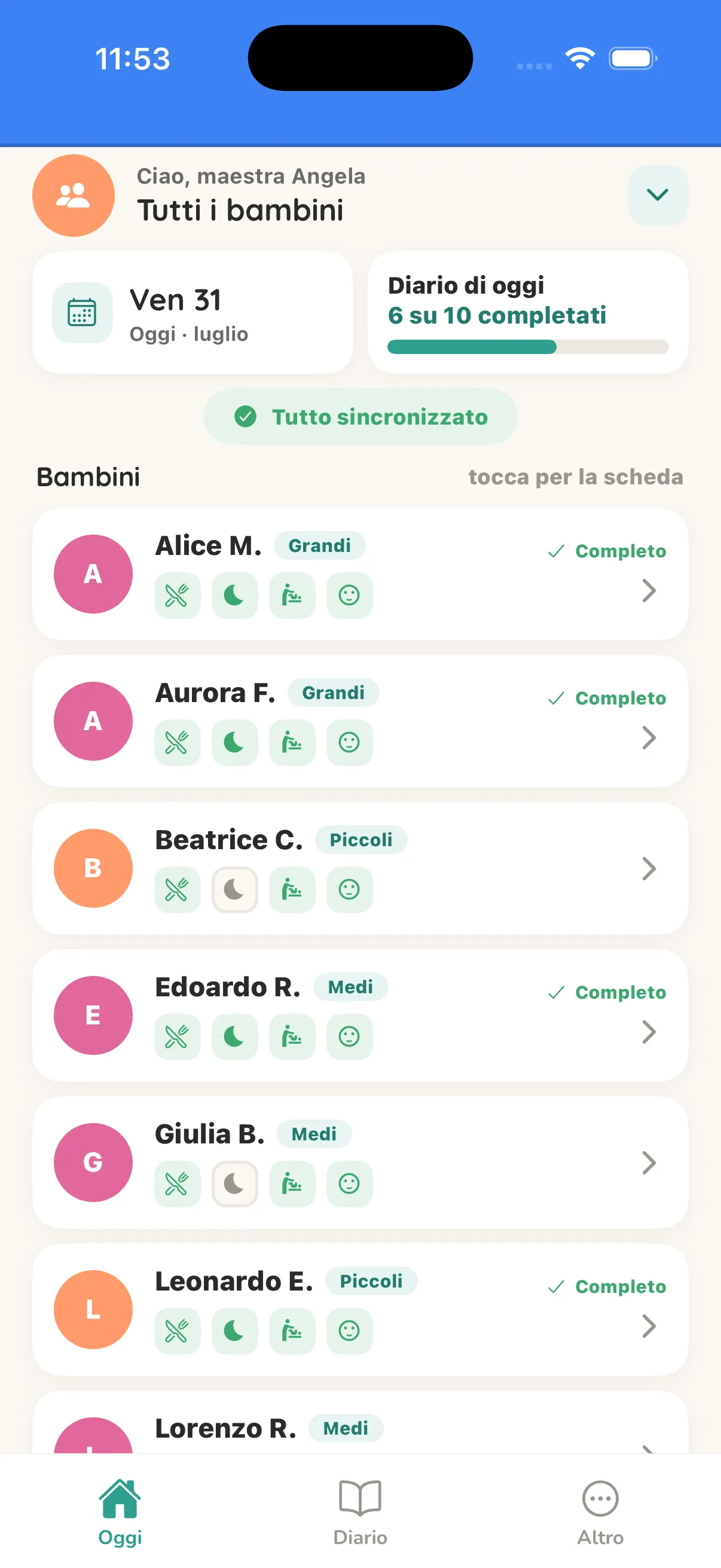
The educational staff app: today’s room with the diary filled in for six children out of ten

A day with Paidos

Here is a typical day, from drop-off to pick-up. Paidos is there at the right moment: communication gets simpler and running the school gets lighter.

12 3 6 9

7.00

The school opens

  1. PAIDOS Families 7.45

    October’s fee is due today.

    Read receipt · read by 50%
  2. PAIDOS Families 9.15

    For lunch: pasta with olive oil, baked plaice and grated carrots.

    Menu updated
  3. PAIDOS Educational staff 11.45

    Today’s diary is well under way.

    6 of 10 completed
  4. PAIDOS Internal 13.00

    A colleague left notes for the afternoon.

    Staff only · never visible to families
  5. PAIDOS Families 14.30

    The educational staff shared photos of the activities.

    Only with photo consent
  6. PAIDOS Families 17.00

    Meals, nap and mood for today.

    Meals · Nap · Mood
  1. The reminder arrives before the gate opens

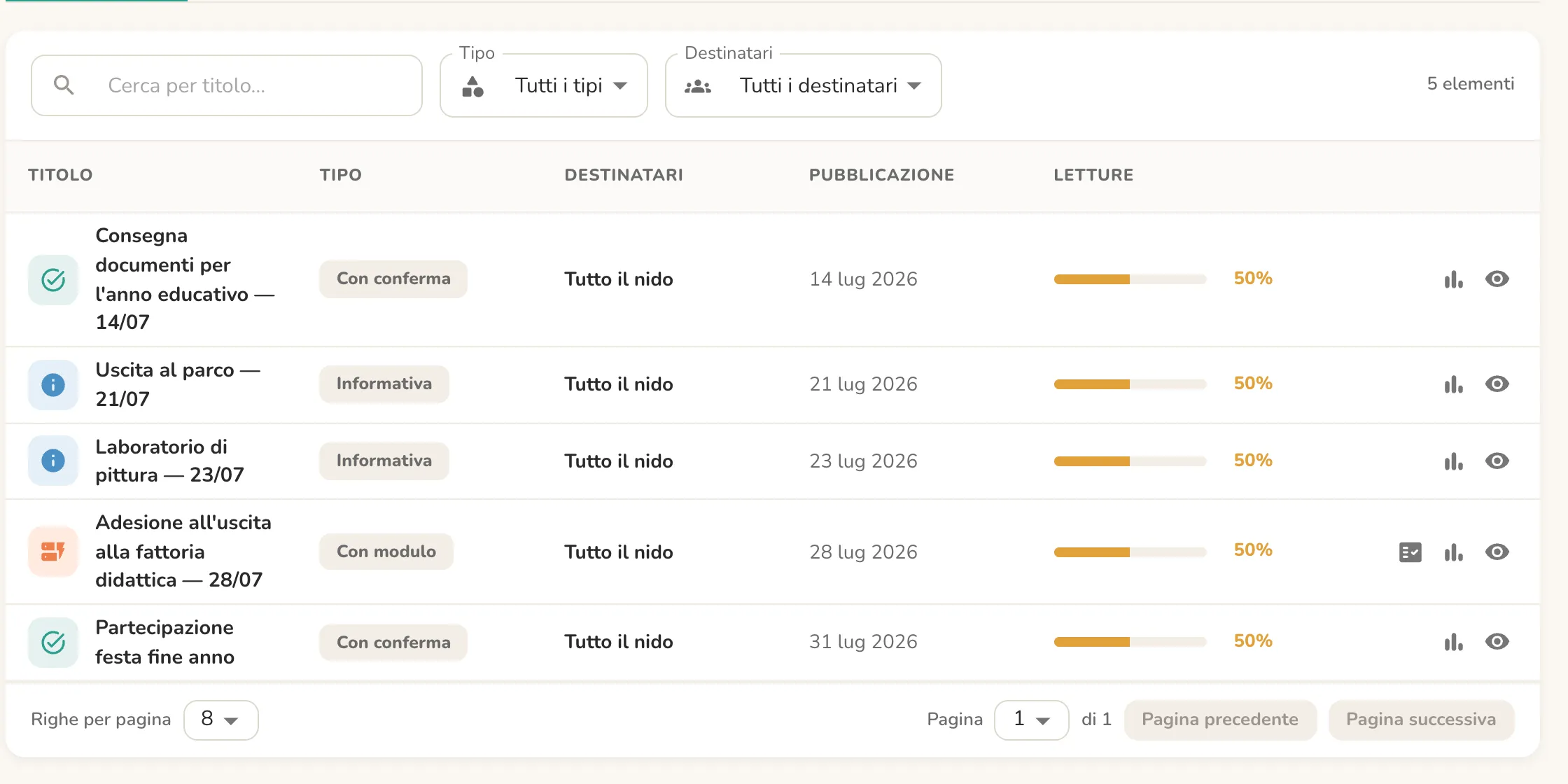
    “October’s fee is due today”, “Tomorrow, bring a change of clothes and rain boots for the outing”. The school sends the reminder to every family and the notification lands on their phone over breakfast. You can see at a glance who has read it: no notes tucked into backpacks, no “I forgot” at the door.

    The announcements list in the back office, with recipients and read receipts
  2. This week’s menu is already published

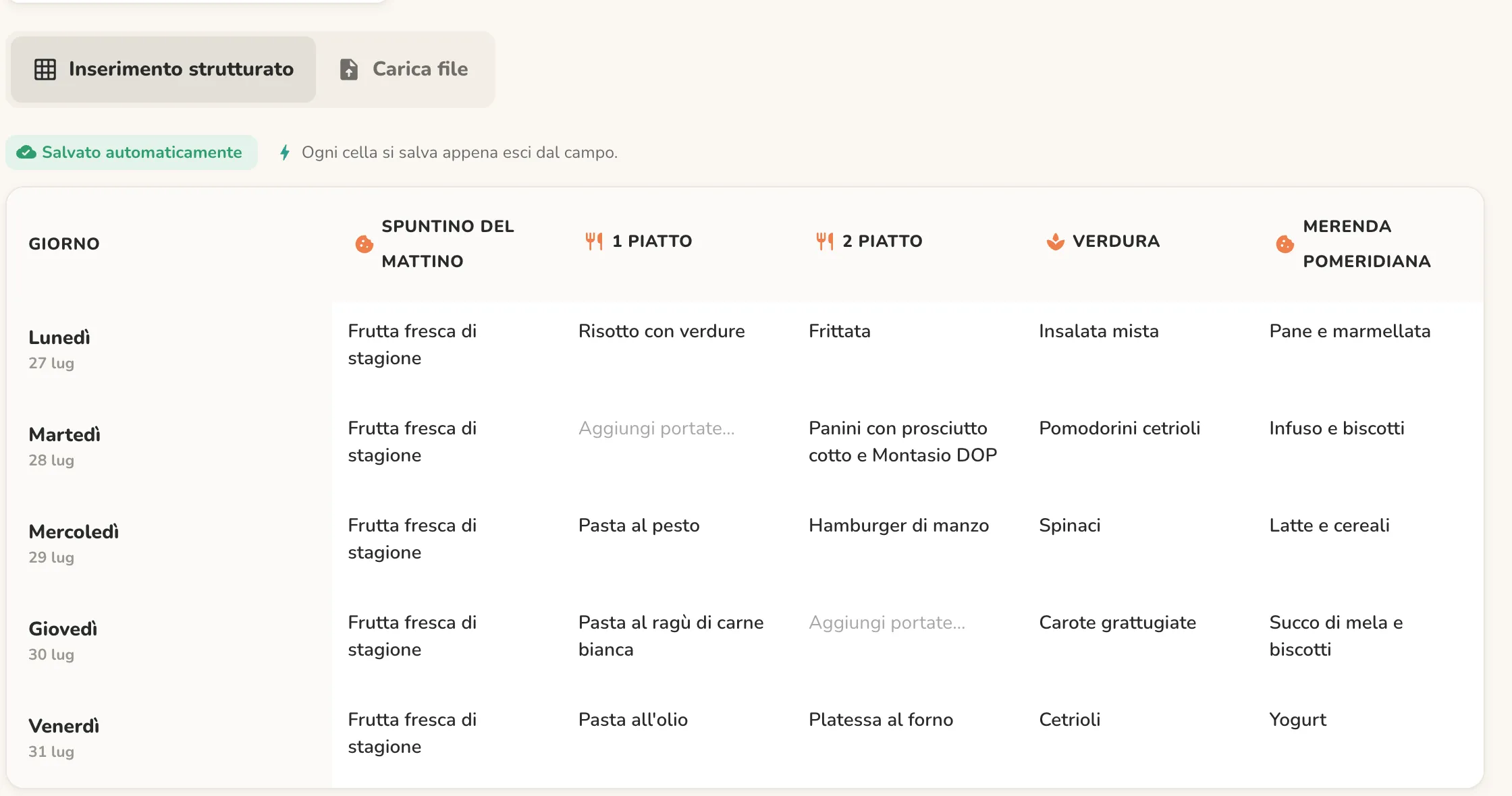
    Planning the menu is easy: enter the dishes in the grid, day by day. If something changes at the last minute, you update the cell and families see it right away in the app.

    The weekly menu grid in the back office, from breakfast to afternoon snack
  3. The diary takes just a few taps

    Every school has its own diary, with the entries it really needs, from meals to activities. Educators and teachers fill it in with a few taps, and a single entry updates the whole room. Anything that concerns just one child goes on that child’s card, straight to their parents.

    The room diary in the educational staff app, showing the day’s entries
  4. The shift changes, the information stays

    Before heading home, whoever finishes their shift leaves a written handover for whoever comes in: how the morning went, what’s needed in the afternoon, who needs extra attention. The notes stay internal to the staff, and the person coming in picks up right where their colleague left off.

  5. While the children nap, the photos reach home

    In the quietest moment of the day, the educational staff upload photos of the activities, tag the children and share them with families. Each parent sees their own child’s moments, without waiting for the evening.

  6. A piece of the day reaches home

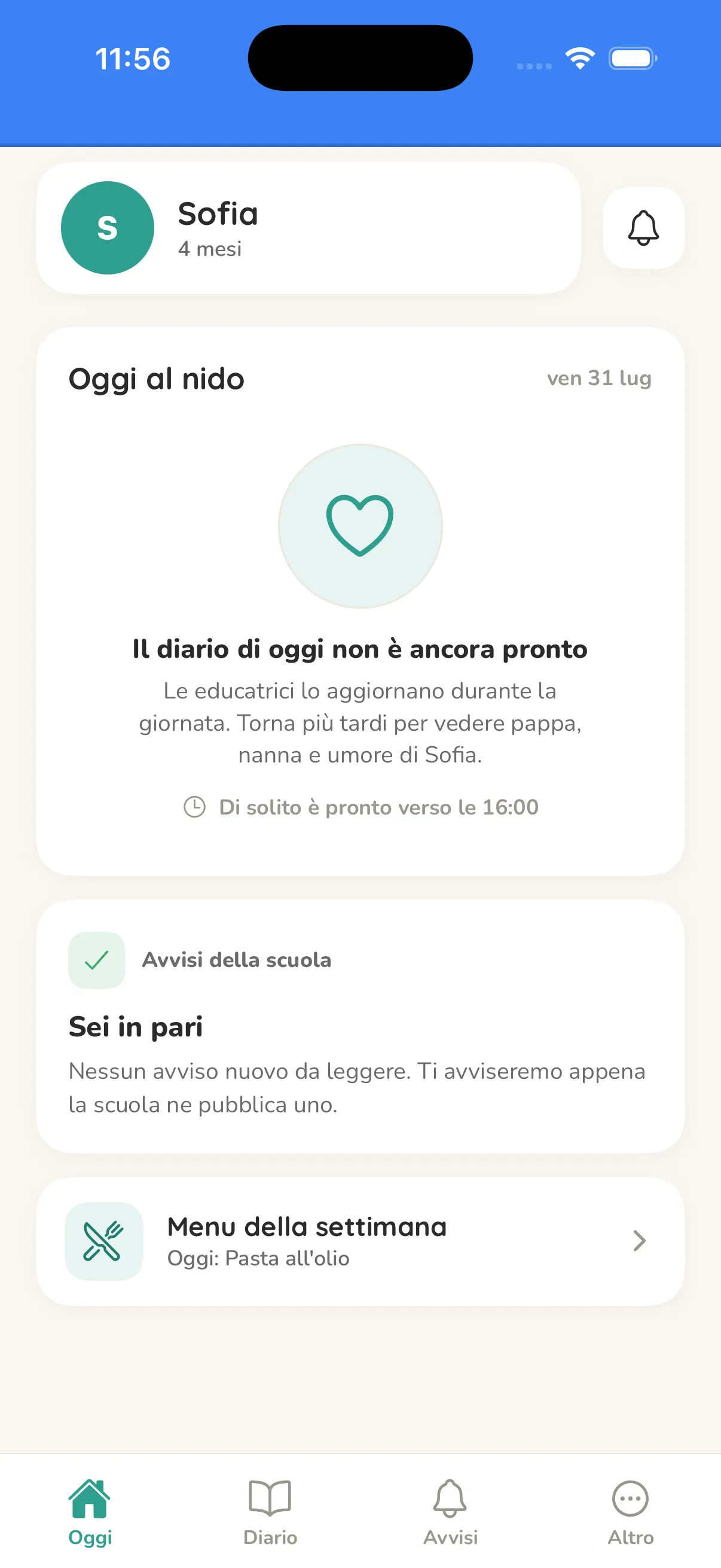
    In the app, each parent finds their own child’s day: photos, menu, announcements and the diary as soon as it’s ready.

    A child’s day in the parents’ app, with meals, naps and activities

One platform, three points of view

Whoever runs the school, whoever works in the room and whoever waits at home need different things. Paidos gives each of them their own view of the same information.

In the office

Web back office

  • Records for children, guardians, rooms and staff, in order and in one place
  • Weekly menus and announcements with forms, attachments and read receipts, updated in real time
  • Staff and family invitations in one click, with roles and permissions already set

In the room

Mobile app

  • The room diary in a few taps, with entries chosen by the school, not the same for everyone
  • Photos of the day with the children tagged, shared with families
  • Written shift handovers between colleagues, visible to staff only

At home

Mobile app

  • A notification when an announcement, the menu, the diary or a photo of your child arrives
  • A board that stays readable: open the app after days and everything is still there
  • Absences reported from the app, without a seven-in-the-morning call

Children’s data is not data like any other

A nursery or preschool handles minors, photographs and notes that brush against health. The technical choices have to bend to that, not the other way round.

The infrastructure sits in Italy
Servers, database and file storage run on OVH in Milan, and the AI-assisted features stay in a European region too. The single exception is push notifications, which travel through Google’s and Apple’s services under the transfer safeguards the GDPR requires.
Photos go through consent
Every child has their own photo consent. Without an active consent their images are not shown to families, and a withdrawal takes effect immediately.
Everyone sees their own part
Roles and rooms decide what opens: staff in one room cannot open the others, a parent only ever sees their own children.
Export and erasure are features, not paperwork
GDPR articles 15 and 17 are exercised from the back office: a child’s data can be exported and deleted without opening a ticket with anyone.
What gets touched stays written down
Sign-ins and sensitive operations land in a readable audit log. Shift handovers, the most delicate notes of all, delete themselves after 90 days.
Emails speak the family’s language
Invitations and notifications arrive in Italian, English, French, Spanish, German, Arabic and Hindi — seven languages, chosen by the family.

Questions we always get

Do we have to install anything at our school?

No. The back office opens in a browser and the app installs on the phones of the educational staff and families. No server to keep in the office, no maintenance on your side.

Can we try it before deciding?

Yes. We walk you through it live, on a sample school that is already full of data, so you see the product working rather than three frozen screenshots. If you then want to try it yourselves, we set up a dedicated environment shaped like your own rooms.

Do educators and teachers have to learn a new program?

The diary is filled from preset answers, with the same gestures as any phone. We configure the entries together around your school’s habits: the software adapts to the day, not the other way round.

How much does it cost?

It depends on how many rooms and families you run. Send us a couple of lines about your school and we’ll send you a tailored proposal, with no obligation.

Does the data stay ours?

Yes. The school is the data controller, we are the processor and we only handle the data to run the service. You can export it whenever you want, and have it deleted if you ever decide to stop.

Let’s talk

Tell us how your school is set up: how many rooms, how many families, what takes up most of your time. A person answers, not a form.

Email us at info@paidosapp.it

We reply within one working day.